Posted on

Culturally Relevant Math Expressions

crme quilt bag designs
Example of CRME quilt designs

Introduction

Lesley STEAM or LSTEAM supports authentic learning that doesn’t supplant what happens in school, but introduces teachers and students to concepts and hands-on experiential skills, using a novel schema for knowing, thinking, and doing in mathematics. For three years, LSTEAM has designed and implemented this approach to bridge mathematics and making. T with the aim was to ignite mathematical curiosity by reinforcing K-8 math skills through culturally relevant hands-on learning. Our approach included developing CRIME toolkits such as Math & Quilting, Tangrams, and Crazy Contraptions, and offering Instructables for teachers via a website dedicated to sharing DIY, step-by-step, project-based instructions. It serves as a platform for makers to document, learn, and collaborate.

Culturally relevant hands-on learning is an instructional approach that engages learners through active, experiential tasks (e.g., making, creating) designed to connect new concepts directly to their cultural backgrounds, lived experiences, community and personal references. It empowers learners by affirming their identity, fostering critical thinking, and utilizing cultural knowledge as a scaffold for deep academic achievement (Ladson-Billings, 1995). Key characteristics and components include focusing on utilizing learners’ existing cultural knowledge and strengths; incorporating cultural references,, traditions, and community knowledge into practical activities; mapping or creating artifacts that connect academic content to relevant, real-world issues; and using toolkits that provide curated, evidence-based resources, strategies, and templates that streamline teaching and learning processes, allowing educators to implement best practices effectively.

During each professional development workshop, teachers received toolkits with materials and links to online Instructables such as 10×10 Conversion Quilt Making, an educational or design technique that involves translating numerical data—specifically fractions, decimals, and percentages—into visual, geometric fabric and 2D foam shape designs, often using 10×10 or 5×5 grids to represent a “whole” (100% or 1.0). They color, design, and calculate the proportions of different colors or shapes, converting them between fractions, decimals, and percentages. During professional development workshops for teachers across the United States, participants were shown how to use their toolkits to physically render their math-based designs. The following sections further describe these kits and the activities that are centered on culturally relevant math.

10x10 conversion quilt design and bag via Instructables
10×10 conversion quilt design and bag via Instructables

Math & Quilting

Our Math & Quilting Toolkit blends quiltmaking with mathematical thinking for grades K-8. It includes supplies and guides for exploring patterns, symmetry, geometry, fractions, and measurement through quilt design and construction. By combining grade-appropriate literature, fabric, templates, grids, and pacing guides, the toolkit helps learners see math as tactile, visual, and deeply connected to diverse quilting traditions. Toolkits include quilt design templates from Gee’s Bend, Alabama, Appalachia (Eastern U.S.). Lakota (Sioux), and mandalas (Buddhism). In addition to the 100-square grid, a smaller 5×5 or 25-square template emphasizes the use of 3D foam shapes with adhesive backing, such as triangles and rectangles, and making quilt patterns requires understanding how these shapes fit together. Books such as The Quilts of Gee’s Bend (2017) and Stitchin’ and Pullin’: A Gee’s Bend Quilt (2016) are provided to help ground teachers and students in the history and traditions of quilt making. Here is an excerpt from the latter:

[T]he girl’s grandma explains the meanings and feelings behind each colored cloth. “Blue cools. / Red is loud and hard to control, / like fire and a gossiping tongue.” Green, orange, yellow, white, pink, and all the others have their own personalities. “Grandma says, / ‘Colors show how you / feel deep down inside.’”

CRME Quilt Making Workshop
Left: CRME quilt making workshop; Right: Advanced work on soft circuits

The LSTEAM team led in-person teacher workshops that included hands-on work and physical rendering of quilt designs. The toolkit enabled participants to learn about and recognize quilts from different cultures and identify and use math concepts to make quilts. Participants also learned how to adhere their physical quilt designs to canvas bags using the ‘appliqué’ method. We also integrated advanced work on soft circuits by embedding electronic components for use on these physical quilts using tools such as conductive fabric tape, conductive thread, LEDs, and sensors.

Left: CRME quilt making bags; Right: CRME supplies

Tangrams

Our Tangram Toolkit builds on the Math + Quilt design templates and uses tangrams to make mathematical concepts visible and intuitive. Tangrams are Chinese geometric puzzles consisting of a square cut into seven pieces that can be arranged to make various other shapes. Through tangram pieces, literature, and design prompts, learners explore geometry, spatial reasoning, fractions, and problem-solving by building and transforming shapes. The toolkit encourages making and mathematical thinking through tactile exploration. This toolkit includes the book Grandfather Tang’s Story (1990) that uses tangram pieces to tell a story. After reading the story, participants can choose animals to make with the tangrams.

tangram examples
Tangram examples via Instructables

Crazy Contraptions

Our Crazy Contraptions Toolkit invites learners to design, build, and tinker with playful, chain-reaction (simple) machines. Using levers, pulleys, wheels, ramps, and connectors, the toolkit introduces core physics and engineering concepts like force, motion, and energy transfer. Through experimentation and iteration, learners discover how simple machines work together to create complex results. With this toolkit, participants can watch a Netflix Jr. Crazy Contraptions & Fabulous Forts video clip that features ‘Ada Twist, Scientist’ and her friends who brainstorm and come up with new ways to solve problems using mechanical engineering. The main character (Ada) is inspired by real-life female scientists like Ada Lovelace and Marie Curie, aiming to promote STEM, perseverance, and curiosity. This toolkit also includes two books that inspired this video clip, Ada Twist, Scientist (2016) and Rosie Revere, Engineer (2013).

Crazy Contraptions workshop

In both in-person and virtual CRME workshops educators were provided with a comprehensive toolkit of materials that could be used to reinforce culturally relevant learning in math for the students in their classroom. We gathered feedback from our work through a series of post-workshop questions to help educators with their reflections on their experiences with us.

When asked to think about identity (with a focus on underrepresented populations in STEM/STEAM):

  • “Understanding identities is key to deliver equitable instruction in the classroom”
  • “Our identity impacts both how we show up and how we feel a sense of belonging in a space

How does quilting and math increase curiosity in students?

  • “Noticing patterns and cutting to precise size, and connecting parts like puzzles”
  • “Allows students to see real world applications – they can see how it can be used in real life”
  • “Helps them to solve problems in different ways”

How will you apply this knowledge into your teaching practices?

  • “Definitely being more intentional in embedding culturally relevant experiences”
  • “I can get creative and implement art”

Lesley STEAM noted the slow expansion of our work in new communities, local and national, as a powerful indicator of success and growth. In addition to facilitating CRME workshops in the United States we worked with international delegations who were interested in best practices in STEAM education in U.S. Higher Education. We were able to share some of the activities created for CRME with representatives from Vietnam, India, Japan, Ireland, and Moldovia.

References

Beaty, A. (2013). Rosie Revere, Engineer.  Abrams Books for Young Readers.

Beaty, A. (2016). Ada Twist, Scientist. Abrams Books for Young Readers.

Ladson-Billings, G. (1995). Toward a Theory of Culturally Relevant Pedagogy. American Educational Research Journal, 32(3), 465–491. https://doi.org/10.2307/1163320

McKissack, P., & Cabrera, C. A. (2016). Stitchin’ and Pullin’: A Gee’s Bend Quilt. Dragonfly Books. 

Rubin, S. G. (2017). The Quilts of Gee’s Bend. Abrams Books for Young Readers. 

Tombert, A. (1997). Grandfather Tang’s Story. Dragonfly Books.

Posted on

2025 Summer Pre-College Creative AI & Design Course

Slim Reaper Pop Up Stage and Presentation

Lesley STEAM offered the pre-college Creative AI & Design course for the second consecutive summer. We recognize the importance of creativity that, fundamentally, requires having or showing one’s ability to produce new and valuable things. With the proliferation of generative AI or GenAI, more and more creative people are using machines as tools to interrogate AI and make art. With this in mind, we worked closely with Cambridge Youth Programs (CYP) to recruit Cambridge, MA youth to explore and go beyond the fundamentals of creative AI, which refers to artificial intelligence systems capable of generating novel and original content, such as art, music, writing, and design

Artwork by Norman Teague and Stephanie Dinkins
Left: Installation view of the exhibition “Designer’s Choice: Norman Teague—Jam Sessions” at MoMA. Photograph by Jonathan Dorado; Right: Installation view of Stephanie Dinkins’s If We Don’t, Who Will? in the Plaza at 300 Ashland Place. Photo by Avery J. Savage

Students were introduced to artists such as Stephanie Dinkins who creates art about AI as it intersects race, gender, and history. They saw the designs of Norman Teague, whose Adobe Firefly-generated works offer a reinterpretation of design history.

Dinkins programmed the generative art to prioritize (more diverse) worldviews and figures. She did so by fine-tuning different AI models, programs that recognize patterns through datasets. Dinkins and her team of developers fed the models images by the Black photographer Roy DeCarava, who captured photos of Black people in Harlem. They also programmed it using African American Vernacular English so that the models would learn to recognize its tonality and better generate images based on the stories of people who use it. —Melissa Hellman via The Guardian

Norman Teague used Adobe Firefly, Adobe’s family of generative AI models, to imagine a world where iconic objects in the Museum of Modern Art (MoMA) design collection were created by a more diverse chorus of voices. Teague, and his assistant designer Daniel Overbey used Firefly to revisit 15 pieces in MoMA’s collection from the perspective of Black history and inspiration.

Continue reading 2025 Summer Pre-College Creative AI & Design Course

Posted on

Girls Make Games

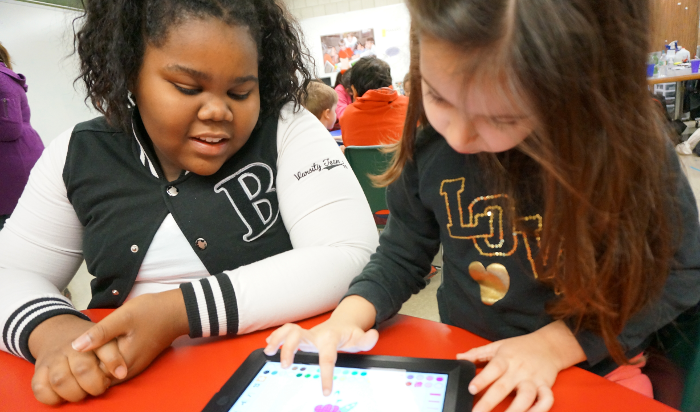
YodaAbove: a 5th grade coder mentors a 1st grader using Scratch Jr. 
A group of nine Kennedy-Longfellow students spent a weekend in November coding as part of the first ever Boston-based “Girls Who Make Games” workshops at MIT. These students immersed themselves in game design, art, and programming using software called Stencyl.

Not only did they get to network with other local girls who code, they were mentored by local professional developers. We sat down with these students and asked them to share their thoughts on what makes them tick as programmers at K-Lo, and beyond. To view the video, click here.

Posted on

KIBO Brings Robotics Alive for JK-2nd Grades

Code

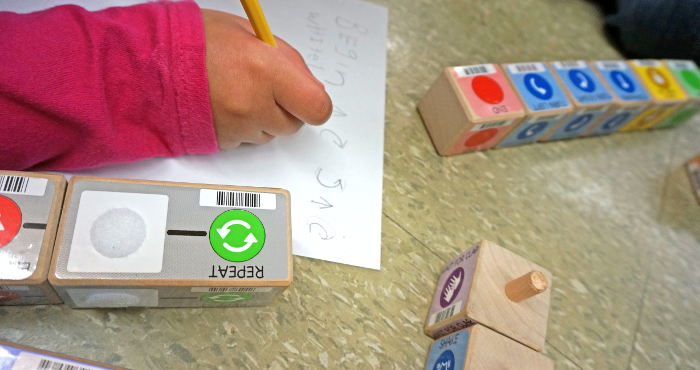
This fall, K-Lo launched robotics in the primary grades in partnership with Tufts University’s Eliot Pearson Department of Child Study and Human Development. The school piloted the KIBO, a robot designed with support from the National Science Foundation, with one kindergarten, first, and second grade class. During the seven week project, students learned about programming, sensors, and the engineering design process with ties to readers theatre in the kindergarten, and earth science in the first and second grades.  

The Lesley team will continue to support the other primary classrooms in learning about the KIBO and how it can be used to deepen understanding and engagement in other curricular activities. To see more about the KIBO, you can see the company discussion of this innovation, and stay tuned to hear more from K-Lo students about their own experiences with robotics!

Check out a couple videos of students presenting their final projects:

Posted on

4th Graders Gone Green

Meet KLO’s first paperless classroom! Karla Anderson’s 4th grade class has jumped into the paperless fray with digital notebooks for science and math. Ms. Anderson walked the class through setting up individualized math and science notebooks in the Notability app. Notability was chosen over other apps because of the following features:

  • Creation of separate, color-coded notebooks.
  • Ability to easily sync with student and teacher district Google doc accounts.
  • Ability to import PDFs and images and draw on top of them.

To share assignments with students, Ms. Anderson simply places a worksheet in a Google docs folder shared with all of her students. Students log into the Google Drive app on their iPads and open the worksheet right into Notability, where they can either type or draw their answers. When finished with the assignment, they “share” the worksheet back into their Google Drive so Ms. Anderson can review, comment and grade the work.

The app Book Creator has long been a favorite KLO app for students to create their own eBooks. Ms. Anderson has found an innovative use for it thanks to Tim Harkins (@mrtharkins), 2nd grade teacher at West Elementary School in Andover, MA, who presented his science eBook idea at the 2013 fall MassCUE Conference. Ms. Anderson has created eBook “texts” for each science curriculum unit. The eBooks are shared out with students via Google Drive. Each student then brings the ePub into Book Creator on their iPad and plug in their answers, photos and videos as the unit progresses. Each text also included pre and post assessments so that students and teacher could see the measure of student growth nested conveniently among the content.

We asked two students to share their experience using the eBook texts as well as to give a brief tutorial on how to use the Notability and Book Creator apps:

Ms. Anderson will then take you deep into her Google Drive process to demonstrate her paperless workflow:

Posted on

The Confidence to Create

Yodamael St. Rose isn’t your typical 4th grader. In the past year she has directed her own movie, programmed interactive games in Scratch, and created a tutorial for other students on how to connect and use the school’s Raspberry Pi (the “3P K-LO”) computer packs at home. We asked Yoda to share what kind of tools and projects give her the confidence to create and here is what she shared with us:

Posted on

3-2-1, Action!

When asked how they would like to present their informational texts on habitats, a group of third grade students unanimously chimed, “the green screen!” The project began with each student identifying a habitat they wanted to study. Research started in the classroom and school library, where students read habitat-specific books and narrowed in on an animal of choice. The group recorded notes in their science journals, distilling their reading into informational bits related to each animal’s environment, prey, and physical characteristics. We then discussed the idea of an essential question to build a deeper focus on one aspect of their animal. It was agreed across the board that everyone was interested in finding out how each animal survives in their respective habitat, but students felt they needed to do more research to explore this question, so we moved onto the iPads where they could access Newsela.com and Kids InfoBits. Newsela.com is a website that produces Lexile-leveled articles on current events neatly organized into categories such as: science, kids, money, law, etc. Students also accessed Kids InfoBits, which is a student friendly database that houses a wealth of text, images and videos. (See student tutorial below.)

Together with the teachers, students chose articles closely related to their animal/environment and set about close readings of the text to hone in on the main themes. After another group check in, it was then determined that all of the students were intrigued by the idea of how climate change was affecting their chosen animal, and essential questions were altered to address this specific interest. It was also agreed that they would like to share their research with their peers by creating public service announcement (PSA) videos using the Makerspace green screen, with one student choosing to make a stop-motion animation using the iPad app myCreate. Once students felt their research was complete, we watched examples of PSAs online to get a sense of how they are crafted to share a strong message with the audience. Inspired by the possibilities, they eagerly jumped into storyboarding, which included writing a script, with specific dialogue for each scene. Students conferenced with a teacher one-on-one to choose corresponding images, music and/or sound effects for each scene. We made sure to use only images and music that were free under public domain.

Students took turns filming their scenes in front of the green screen (simply a large green cloth backdrop!), reading their script off of the SmartBoard projection. The one student doing the stop motion created a backdrop and characters out of felt, and using myCreate on her iPad, took a still image of each different movement of her characters that were automatically combined into one timeline video. Lastly, the green screen and myCreate footage were brought into iMovie, where students worked with teachers to add in images, music, or narration to their video. The final products shared out with third grade students and families to much applause.

Student videos:

Student tutorial on safe research sites:

Posted on

Junior K uses Augmented Reality to Search for Gingerbread Men! (JK)

GB2_edited-1

Junior Kindergarten (JK) students at Kennedy-Longfellow school solved the mystery of the missing gingerbread cookies with some help from an augmented reality iPad app called Layar. JK teacher Siobhan Patterson developed the interactive scavenger hunt, based on the Gingerbread Man book, which included gingerbread cookie paper cut outs placed with different staff throughout the school. Audio clues were prerecorded on the computer using Garageband and pitched up to mask the teacher’s voice, as well as sound more “gingerbready.” The recorded clues were cued by holding the iPad in front of each gingerbread cut out with the Layar app interface open. When the Layar app recognized the image, it triggered an overlay of an audio recording (it could be video, image — or whatever you want) and the students pressed the play button to hear the clue.

Once the group solved each of the clue “riddles” they were excitedly off to the next location! Ms. Patterson found that it helped to hold up the iPad as close as possible as well as make sure there was enough light for the Layar app to recognize the trigger images. Teachers at KLO are excited about the possibilities with Layar, especially experimenting with using it to support language acquisition.


Posted on

Reading Strategies Video

Ms. Hanna’s first graders at the Kennedy-Longfellow School decided to make a video to share the reading strategies they are learning at school with their families. The class began by a whole brainstorming session to write song lyrics based on the 5 reading strategies they had been learning in class:

  1. Look at the pictures.
  2. Make the first sound.
  3. Read it again.
  4. Look for a chunk you know.
  5. Think about the story.

Once the song was complete, they broke up into groups based on the five strategies. Each group devised a visual prop or idea for their scene and shared it back with the class for fine tuning. Finally, the moment the class had been waiting for: shooting the video! Everyone was feeling pretty energetic, so we started with the singing and dance scenes first. Students memorized the strategy song and sang/danced their hearts out in their classroom and in the library while the teacher videotaped the show. Then each group took turns having their scene videotaped (this took several takes each until the group agreed on a good shot). Finally, the teacher dove into editing the movie using iMovie on her laptop, including adding captions for each scene. The group was ecstatic with the final result and couldn’t wait to share it with their families. Here is the first grade Reading Strategies video:

Posted on

Scratch & Programming Club (2nd-5th)

Students in the after school Scratch Club have been using the MIT developed software, Scratch, to program their own animations and video games. Scratch is a kid-friendly tool based on color-coded programming blocks that snap together to create unique scripts, or codes. Since September, students have created interactive video games, multi-stage mazes and animations. We will also be using 2 LEGO We-Do robotics kits and the invention kit, MaKey MaKey, which uses alligator clips and USB to create interactive programs between objects and a computer. The Scratch Club is very excited to be presenting their projects at the 2013 Lesley Community of Scholars Day on March 27th.

Scratch Projects showcased at the Lesley University 2013 Community of Scholars event

ScratchHelp2